

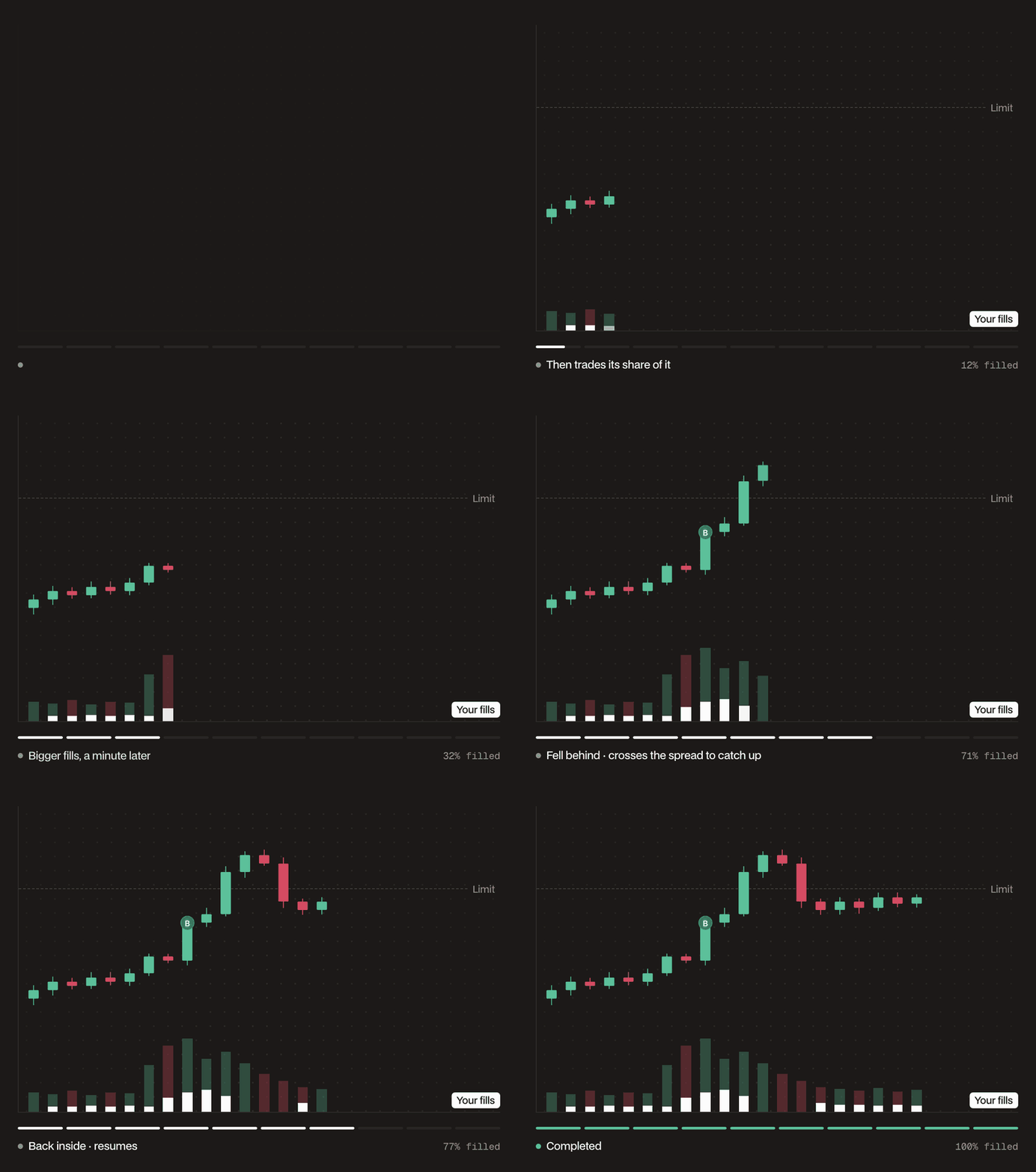
How it places orders
- Each minute, the POV counts the volume the market traded in the minute that just closed and sets how much it owes, so that your fills make up your rate of all the volume, yours included. At 5%, for every 95 BTC other traders buy and sell, the POV owes 5 BTC. It works that amount evenly over the next minute, so it trails the market by about a minute.
- One post-only limit order works what the POV owes at the top of the book, as a Chase order does.
- Once a minute, one market order fills whatever the chase has not, capped at 8% slippage and never past your limit.
- With a limit, only volume that trades inside your limit counts toward what the POV owes. For a minute that trades on both sides of your limit, that share is estimated from the minute’s price range. While the price is beyond your limit, the chase rests at the limit, sweeps are skipped, and Details show Paused: price beyond your limit. When the price comes back, the POV resumes from the next minute.
- The POV never catches up in a burst. If it falls more than about two minutes behind its pace, the extra is dropped rather than traded all at once.
- If market data stops arriving, the POV adds nothing new until it returns, and Details show Paused: market data unavailable. A quiet market with no trades simply adds nothing.
- With Reduce Only, each order is capped at your position, or on a spot sell at your free balance, so the POV never adds to or flips the position.
- The chase orders rest on the book and pay the maker rate. Sweeps take liquidity and pay the taker rate. Every POV order, sweeps included, pays the same builder fee as limit orders you place yourself.
When to use it
- Work a large order without becoming more than a set share of the market, so your trading stays a small part of what the market is doing.
- Trade faster when the market is active and slow down when it goes quiet, without choosing a duration in advance
- Set a worst price and let the POV wait out moves past it. Volume outside your limit does not count, so the POV does not build up size to dump when the price comes back.
Parameters
The panel shows the order value, at your limit price or at the mid price without one, the fees, and Est. time to fill. The estimate assumes the market trades its average minute over the last 24 hours, and ignores your limit. If it is longer than 30 days, the longest a POV runs, the order can’t be placed: raise the rate or lower the size. Once you enter a size, a line under the form names the first setting out of range, and the order can’t be placed until you fix it.
Example
BTC trades at $100,000. To buy 50 BTC without being more than 5% of the market or paying more than $101,000, you set Size 50 BTC, keep the default Participation Rate of 5%, and tick Limit Price at $101,000. Suppose other traders trade 19 BTC inside your limit in the first minute. Over the next minute, the POV works 1 BTC, so its fills are 1 of the 20 BTC traded, 5%. Its chase order rests at the best bid, and the minute’s sweep buys whatever the chase did not fill, at $101,000 or better. If other traders’ volume jumps to 57 BTC in a minute, the POV works 3 BTC the minute after. If BTC rises above $101,000, the volume that trades there does not count, the chase rests at $101,000, and Details show Paused: price beyond your limit. When BTC comes back below $101,000, the POV resumes a minute later. Details show the share of volume it has taken next to your target, such as Limit $101,000 · 4.83% of volume, target 5%. At about 19 BTC a minute from others, the 50 BTC fills in under an hour, and the POV ends as Finished.How it ends
- Finished: your full size has filled. With Reduce Only, it also finishes when there is nothing left to reduce.
- Expired: it reached the end of its run, 30 days after you placed it at most, with the rest unfilled. There is no final sweep. On a connected wallet, it ends sooner: an hour before the wallet’s API connection expires, or after 24 hours when that time is not known.
- Terminated: you stopped it, or its order was canceled or changed directly, for example in the Hyperliquid app or the Hyperdash iOS app. When you stop it, Hyperdash cancels its order on the book. When its order is canceled or changed directly, a toast says the POV has ended, and a changed order stays on the book as a normal order you manage. What filled stays filled.
- Error: Hyperliquid rejected its orders five times in a row, for example for insufficient margin, or another exchange error stopped it. Hyperdash cancels its order on the book, what filled stays filled, and History shows the message.
A POV must be worth at least $10,000 at your limit price, or at the mid price without one, or 10,000 of the quote token on spot. Each order it places must also clear Hyperliquid’s minimum. Below that, the chase doesn’t rest and the shortfall carries forward until it clears the minimum.
You can run one POV per market at a time, across all your wallets and subaccounts. A running POV cannot be edited: stop it and place a new one.
When you place a POV, your account must be able to fund at least half of the full order. Reduce-only perps POVs skip this check. Nothing is set aside for later orders, so each order still needs margin or balance when it goes out.