

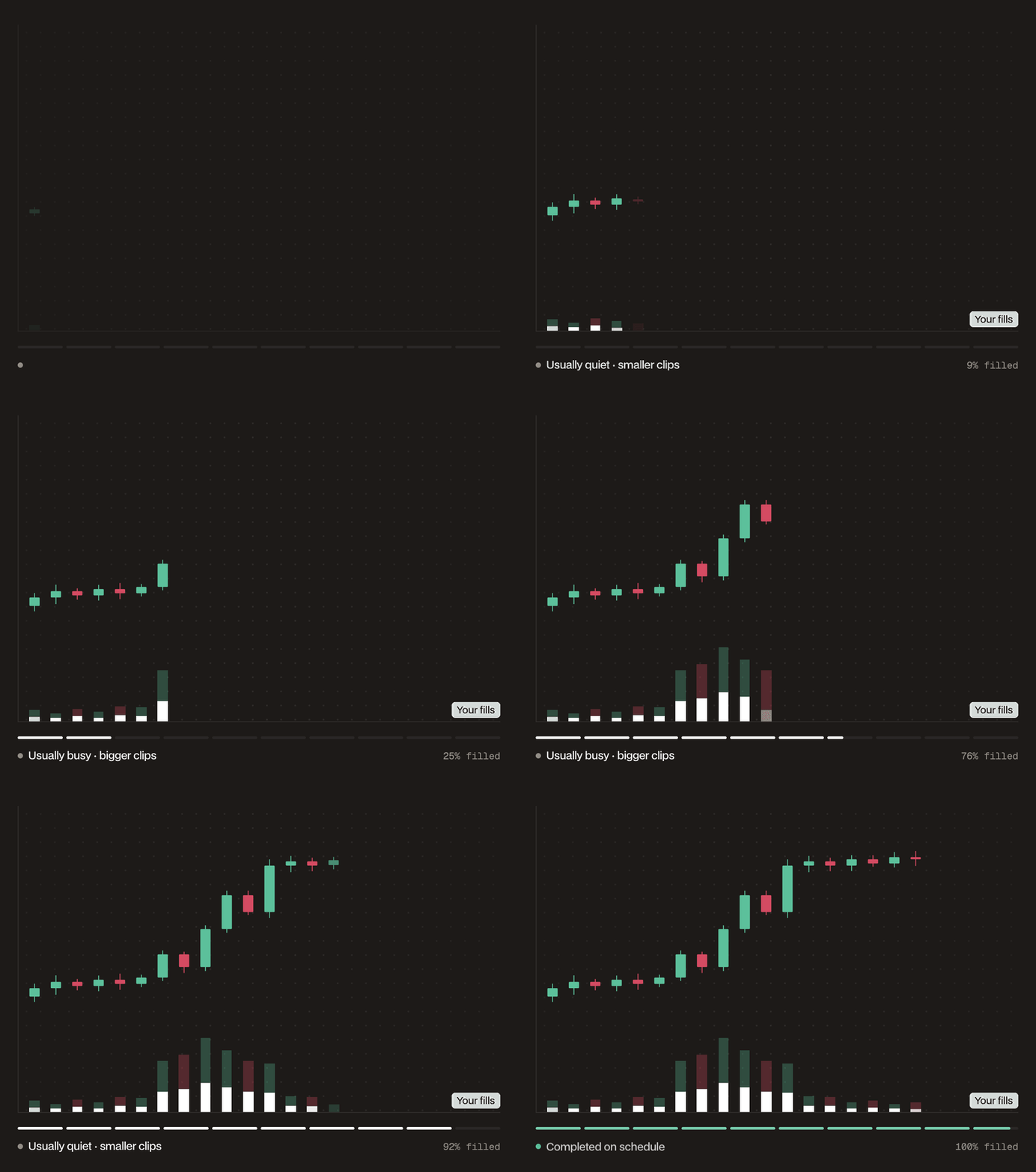
How it places orders
- Divides your duration into 30 second clips. Each clip works toward the share of your size that the schedule has due by the end of that clip, so clips are larger in busy hours and smaller in quiet ones. An underfilled clip rolls into the next one, and the last clip’s target is your full size.
- During each clip, one post-only limit order works the clip’s target at the top of the book, as a Chase order does.
- On each sweep boundary, and again at the end, one market order fills whatever the chase did not, capped at 8% slippage and never past your limit. Sweeps run every minute for orders up to 3 hours, every 3 minutes up to 24 hours, and every 5 minutes beyond that.
- The schedule comes from the market’s last 8 weeks of volume, in 30 minute slots of New York time, with separate levels for weekdays, Saturdays and Sundays. Days run from 8 PM to 8 PM New York time, so Saturday starts at 8 PM on Friday. A slot’s level is its median over those days, and never less than a tenth of the average slot, so quiet hours still get some of the order. The schedule is set when you place the order and does not react to the volume that trades during your window.
- With a limit, no order trades past it. While the price is beyond your limit, the chase rests at the limit, sweeps are skipped, and the order falls behind schedule. When the price comes back, the next sweep catches up, at your limit or better.
- With Reduce Only, each order is capped at your position, or on a spot sell at your free balance, so the VWAP never adds to or flips the position.
- The chase orders rest on the book and pay the maker rate. Sweeps take liquidity and pay the taker rate, and they do more of the work where the schedule climbs steeply, such as at the US market open. Every VWAP order, sweeps included, pays the same builder fee as limit orders you place yourself.
When to use it
- Work a large order over a day or longer, aiming for the market’s VWAP. The volume schedule matters most over such windows, and helps little over 4 hours or less.
- Put more of your size into the hours when the market trades most, and less into quiet hours and weekends
- Set a worst price for a long schedule. Unlike Chase TWAP, a VWAP with a limit leaves unfilled whatever the limit keeps out of reach.
Parameters
The panel shows the order value at the mid price and the fees. Once you enter a size, a line under the form names the first setting out of range, and the order can’t be placed until you fix it.
Example
BTC trades at $100,000. To buy 10 BTC over a working day without paying more than $101,000, at 8:00 AM New York time on a Monday you set Size 10 BTC and Limit Price $101,000, and keep the default 12 hours. That is 1,440 clips of 30 seconds, with a market sweep every 3 minutes. Suppose BTC’s history puts 6% of the window’s volume in the half hour from 9:30 to 10:00 AM and 2% in a quiet half hour in the evening. The schedule then targets 0.6 BTC in the first, 0.01 BTC per clip, and 0.2 BTC in the second, about 0.0033 BTC per clip. An even TWAP would target about 0.42 BTC in every half hour. If a busy clip’s chase fills 0.004 BTC of its 0.01 BTC, the next clip works 0.016 BTC, and the next sweep buys whatever is still behind schedule. If BTC rises above $101,000, the chase rests at $101,000, the sweeps wait, and Details show the VWAP falling behind schedule. At 8:00 PM a final sweep buys what it can of the rest at $101,000 or better, and the VWAP ends as Finished. Anything the limit kept out of reach stays unfilled.How it ends
- Finished: your full size has filled, or the window has ended. At the end, a final sweep fills what it can of the rest. Anything left stays unfilled, such as a remainder worth less than Hyperliquid’s $10 minimum or size your limit kept out of reach. With Reduce Only, it also finishes when there is nothing left to reduce.
- Terminated: you stopped it, or its order was canceled or changed directly, for example in the Hyperliquid app or the Hyperdash iOS app. When you stop it, Hyperdash cancels its order on the book. When its order is canceled or changed directly, a toast says the VWAP has ended, and a changed order stays on the book as a normal order you manage. What filled stays filled.
- Error: Hyperliquid rejected its orders five times in a row, for example for insufficient margin, or another exchange error stopped it. Hyperdash cancels its order on the book, what filled stays filled, and History shows the message.
The order must be worth at least $10 at the mid price, or 10 of the quote token on spot. A buy with a limit below the mid price is valued at its limit instead. Each order it places must also clear Hyperliquid’s minimum. Below that, the chase doesn’t rest and the shortfall carries forward until it clears the minimum, so the sweeps do more of the work. Clips in quiet hours are smaller than average, so a small order over a long window can fall below the minimum there. Increase the size or shorten the duration to keep clips above it.
A VWAP needs at least one week of trading on the market: 5 weekdays, a Saturday and a Sunday, not counting today or the day the market listed. With more history, the schedule uses up to the last 8 weeks. A newer market is refused with “Not enough trading volume history”.
You can run one VWAP per market at a time, across all your wallets and subaccounts. A running VWAP cannot be edited: stop it and place a new one.
When you place a VWAP, your account must be able to fund at least half of the full order. Reduce-only perps VWAPs skip this check. Nothing is set aside for later clips, so each order still needs margin or balance when it goes out.