

Example answer
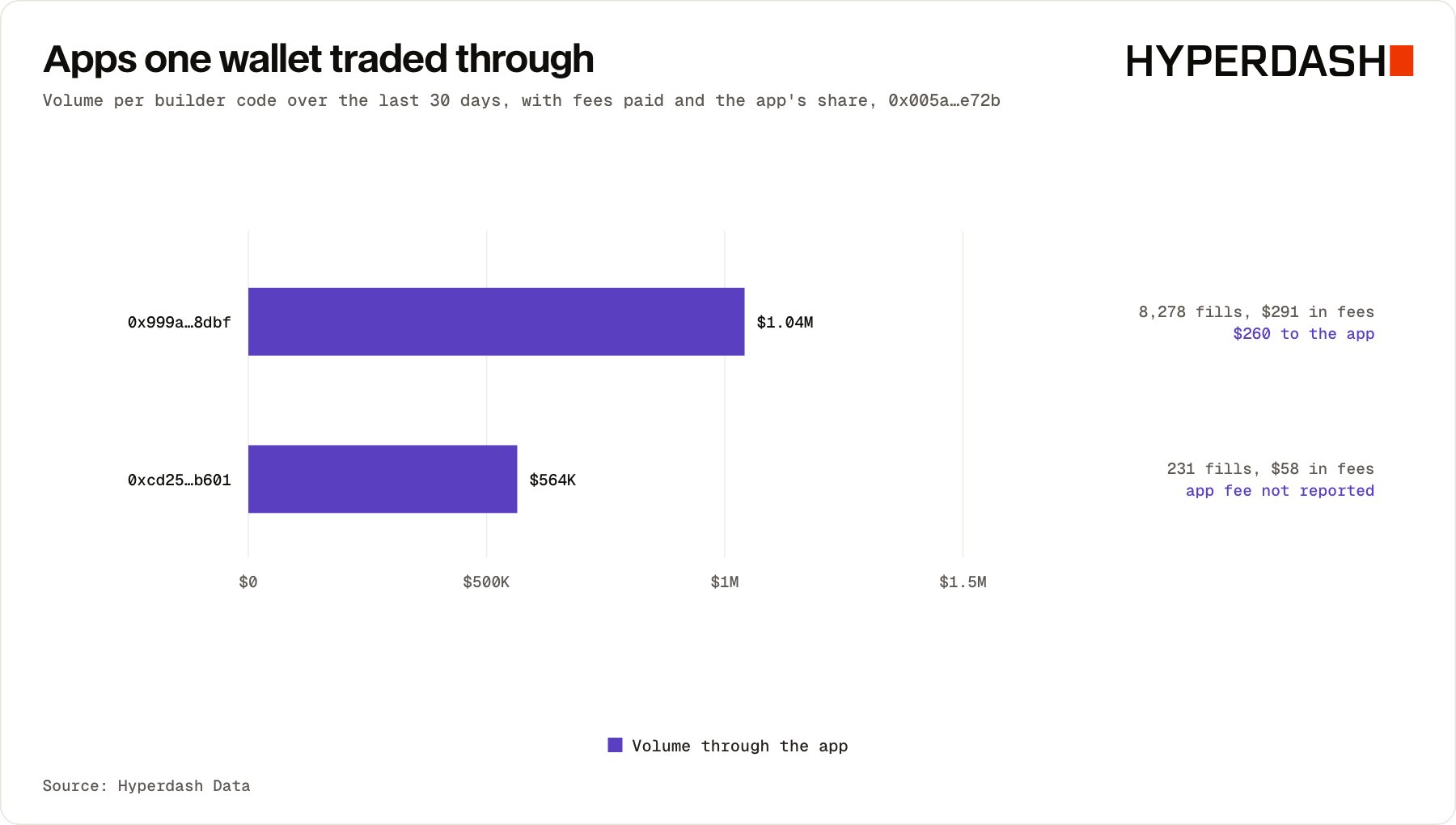
As of Nov 23, 2026, 11:20 AM EST. Wallet0x005a…e72b traded through 2 apps in the last 30 days:
It has approved 4 builders:
0x999a…8dbf up to 10 bps, 0xbd47…7264 up to 100 bps, 0x1924…80e5 up to 10 bps, 0xcd25…b601 up to 100 bps.
Run the prompt for current numbers.
API calls
Set your key and the values the calls use first:1
List the apps it traded through
Fills sent with a builder code, per builder and fee token, highest builder fees first. A builder code is the address of the app or bot that routed the order.Reference: Builder fees paid
2
List the approved builders
3
Read the fee cap of one builder
The maximum fee the wallet allows this builder, in tenths of a basis point. Reference: Maximum approved builder fee
0 means not approved.View more recipes
Learn more
Hyperdash Data API
Hyperliquid market and account data over REST and streams.
Query data from Claude
Ask Claude or ChatGPT about Hyperliquid data.